


Bayshore + Neon Glow Styles is a script font by Set Sail Studios, available as OTF, TTF and WOFF files for $4.99 on TMFonts, or included with membership ($9/month).
About the Product
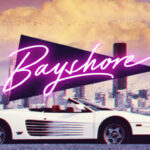
Perm your hair, squeeze into your lycra, and retro-fy your text with Bayshore! A totally tubular mono-line script font straight out of the 80’s.
This hand-drawn font is perfect for creating slick & stylish lettering. Whether it’s for logos, product packaging or merchandise, Bayshore is guaranteed to give your text an unmistakeable retro quality.
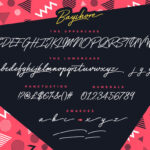
Bayshore comes as a single font file with plenty of added features which allow you to customise your text;
Large Glyph Set • Full upper & lowercase a-z character set included, with a large range of punctuation and multilingual support.
End Swashes • Each lower-case character has a separate ‘end-swash’ version, use this for the last letter in a word to give it a custom-feel styling. These end-swashes are accessible via any software with Opentype capabilities, simply by turning on ‘Stylistic Alternates’.
Underline Swashes • Four swashes of varying lengths are also available, simply by typing any of the square brackets [ ] { }. These can be used to underline your text and give it a real eye-catching quality. With a bit of extra imagination the swashes can also be integrated with the letters to create extended strokes.
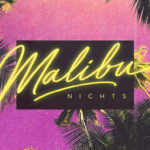
New Update! 10 Neon Glow Photoshop Styles (requires Photoshop) • I’ve also included 10 neon glow Photoshop layer styles, perfect for adding that extra flash to your Bayshore text. Simply open the ‘Bayshore Neon Glows.asl’ file with Photoshop to install it to your style presets! (See final preview image for a video installation & usage guide).
If you’ve already previously purchased Bayshore, and would like to receive the new Photoshop styles, you can simply re-download the product right here on the font page. Just hit the ‘Download Now’ button at the top of the page!
Thanks for looking & I hope you enjoy it! Please don’t hesitate to drop me a message if you have any issues or queries. And in the words of one of my favourite 80’s movies, always remember;
“Be excellent to each other.”
Questions about Bayshore + Neon Glow Styles
Who designed Bayshore + Neon Glow Styles?
Bayshore + Neon Glow Styles was designed by Set Sail Studios. TMFonts credits the designer on every font page, and you can see all of their fonts on the Set Sail Studios page.
What file formats does Bayshore + Neon Glow Styles come in?
Bayshore + Neon Glow Styles comes as OTF, TTF and WOFF files (736 KB download). OTF and TTF install on Windows and macOS and work in design apps such as Photoshop, Illustrator, Canva desktop and Figma; WOFF is for websites.
How much does Bayshore + Neon Glow Styles cost?
Bayshore + Neon Glow Styles costs $4.99 as a one-time purchase with instant download. It is also included in TMFonts membership ($9/month), which gives unlimited downloads of all 95 fonts in the store. Membership is a one-time payment and does not renew automatically.
Can I use Bayshore + Neon Glow Styles for commercial projects?
What you may do with Bayshore + Neon Glow Styles, including commercial work, logos, websites and apps, is set by the licence file included in the download (license.txt or EULA). Read it before commercial use; if your project isn't covered, email [email protected] with the font name and how you plan to use it.
How do I install Bayshore + Neon Glow Styles?
Unzip the download. On Windows, right-click the OTF (or TTF) file and choose Install. On a Mac, double-click it and click Install Font. Restart your design app if it was open. For a website, upload the WOFF file and load it with @font-face.
Customer reviews
No reviews yet. Bought this font? Be the first to share how you used it.
Reviews come from verified buyers only. Log in to review this font